

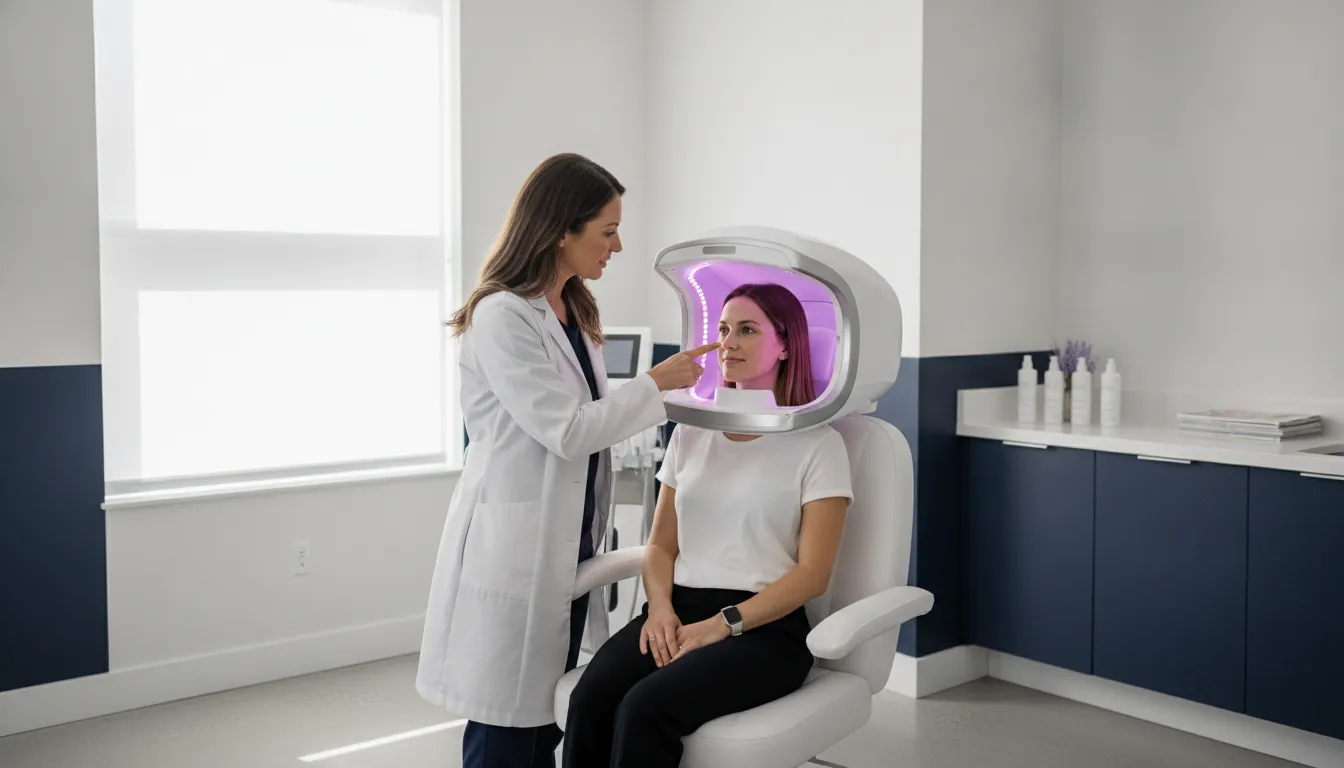
Image Pro Halo is Emage Medical’s budget-conscious 3D skin imaging system for practices that want documented skin findings in the consultation room. The live product page describes high-resolution 3D capture, four light sources, and an analysis of 11 skin items. It also prints a customized shopping cart of products the practice already offers.
This guide is for practice owners, medical directors, and clinic managers comparing ImagePro Halo with the rest of a device shortlist. It covers what the system documents, how a capture fits a visit, and which training and support questions to ask before you lease or buy. Specs below come from the ImagePro Halo product page. A short remote tour is the right place to confirm workflow, not a brochure.
What Image Pro Halo Documents in a Consultation
ImagePro Halo is built as a capture station, not a handheld camera. Emage Medical describes a self-cleaning station with a retractable hood that blocks background light. A gray card white-balances every capture. Those controls matter when you compare photos months apart. Consistent light and framing make a before-and-after set easier to trust.
Practices usually feel the gap when a phone photo from March cannot be lined up with a phone photo from September. Room light, distance, and color shift the picture even when the skin has not changed much. A hood and a fresh white balance do not remove the need for a protocol. They do give the team a fixed starting point.
The page lists four light sources: normal, parallel polarized, cross polarized, and UV. LED lamps supply 385 nanometer light for the UV images. The stated resolution is microscope-like zoom at 9,280 by 13,920 megapixels. Treat that figure as the manufacturer’s specification. Ask to see a live zoom during a tour rather than judging it from a screenshot.
The software analyzes 11 items. Each one is a consultation topic, not a score to memorize.
- Pores.
- Wrinkles.
- Dermal pigment.
- Epidermal pigment.
- Skin tone.
- Skin type.
- Vascularity and inflammation.
- Sebum.
- Porphyrin ratio.
- Skin texture.
- Hydration levels.
A separate hydration meter is called out as useful for practices that already offer erbium, CO2, or IV therapies. The system can also compare a client’s findings with the average for that client’s age group. Use those outputs as consultation visuals and documentation. They are not a diagnosis, and they do not replace a clinician’s exam.
Read the list as a menu of talking points. Pores, texture, and wrinkles are easy for a client to see. Dermal pigment, epidermal pigment, vascularity, sebum, and porphyrin ratio need a plain explanation. Skin tone, skin type, and hydration levels connect the image to the plan you already sell. If your team cannot explain an item in one sentence, leave it off the client handout until training covers it.
Age-group context is a comparison aid. It is not a claim that the client looks older or younger than the number on the screen. Tell the client what the comparison is based on. Do not let a single graphic set the treatment plan by itself.
Two client-facing outputs are built in. The station prints a customized shopping cart of your products. It also generates a QR code so the client can open the report on a phone or by email. That is the practical handoff. The client leaves with the images, not only a verbal recap.
How a Capture Fits the Visit
A useful imaging visit has a repeatable order. The hardware details above only help if the team uses the same sequence every time. Practices that already image new aesthetic clients can map Halo onto that sequence instead of inventing a second process.
- Seat the client at the capture station and close the retractable hood so room light does not shift the image.
- Let the gray card white-balance the capture before you save the set.
- Review the 11 analysis items with the client, including the age-group comparison when it helps the conversation.
- Use the hydration meter when the plan involves erbium, CO2, or IV therapies.
- Print the shopping cart of products you already offer, or send the QR report to the client’s phone or email.
- Save the aligned images so a later visit can show change, not a new unrelated photo.
Emage Medical describes real-time before-and-after photos that are electronically aligned so clients can see change. That alignment is a documentation tool. It is not a promise of a clinical result. Pair the images with the treatment notes your medical director already requires.
Decide in advance who owns the file. A front-desk photo that nobody opens again does not change a consult. Many practices attach the report to the chart and review one or two items at the next visit. That habit is what makes the QR handoff useful after the client leaves.
UVA+ sanitizing is part of the published Halo feature list. The wider ImagePro line is described as including automatic sanitizing between uses. Confirm the exact between-client step on a tour so your infection-control policy matches the device you install. Do not assume a sanitizing cycle replaces your written protocol.
Also check the room, not only the software. The hood has to close without blocking a doorway, and the client has to sit still long enough for the set. Ask how much floor space the station needs and whether it rolls. A spec sheet will not show a tight treatment room.
Training, Warranty, and Software Questions
Support terms are published at the ImagePro line level and repeated on the Halo page. Read them as questions to confirm, not as a signed agreement. The product page states unlimited training during the warranty period. The line describes free one-to-one training focused on consultations that recommend products or services you already offer. When you call, Emage Medical says you speak with a person.
Software is the other cost to pin down. Halo checks Emage Medical servers for upgrades on every startup. Those lifetime upgrades are described as having no added partner fee. The ImagePro line also states there is no annual licensing fee. Ask whether that covers every software module you plan to use. Ask what happens if the station cannot reach the update server.
Warranty language on the ImagePro line is a three-year warranty with a five-year extended option. Confirm that the Halo unit you are quoting carries that same term. Ask what the extended option costs before you compare leases. A lower monthly payment is not the full cost if training, updates, or a longer warranty sit outside the quote.
Trade coverage is context, not a spec. In a May 2026 MedTech Outlook profile, Emage Medical discussed Image Pro systems, including Halo, as tools that help clinics move from patient-led visits toward structured plans. The same profile says studies found Image Pro up to 98 percent accurate versus dermatologist observation. That figure is a company statement in a trade profile. It is not a Halo-only trial, and it is not a detection rate you can paste into an ad. Ask which study, which conditions, and which model were measured before you repeat the number.
Keep your own claims smaller than the manufacturer’s. “We image 11 documented skin items and review them with you” is supportable from the product page. “We diagnose your skin” is not. The same rule applies to downtime, comfort, and outcome language. Halo is an imaging system. It does not perform a treatment, so do not borrow result claims from the devices you use after the consult.
What to Compare Before You Lease or Buy
Halo is positioned as high-end features in a budget-conscious system. The only published payment figure is a lease as low as $287 per month with no prepayment penalty. Purchase price is not listed on the product page, so do not treat the lease floor as the purchase price. Financing programs are available across the ImagePro line. The right comparison is quote against quote.
The product page also shows an example return, not a forecast for your practice. The labeled example uses 10 consultations a week and a $500 average initial purchase. It then applies a 23 percent increase in that initial revenue. The page states a first-year revenue increase of $59,800 from those inputs. The inputs are illustrative. Your result depends on how many new clients you image, what they buy, and whether the team uses the report. Do not publish that dollar figure as your expected revenue.
A cleaner internal check uses your own numbers. Count how many new aesthetic consults you do in a normal week. Note the average first purchase on those visits today. Then ask what would have to change, such as a higher attachment of products you already stock, for the imager to matter. If you cannot name that change, the lease price is not the decision. The workflow is.
Lease language needs the same care. “As low as $287 per month” and “no prepayment penalty” are the published phrases. They are not a promise of $0 down, deferred payments, or a zero-interest period. Get those terms in the quote if they matter, and do not add them in your ads.
| Question to confirm | What the Halo page states | What to verify on a tour |
|---|---|---|
| Capture hardware | Self-cleaning station. Retractable hood. Gray card white balance. Four light sources. 385 nm UV LEDs. | Room size. Hood clearance. How long one full capture takes. |
| Analysis output | 11 items. Age-group comparison. Hydration meter. Printed shopping cart. QR report. | Which of your services can appear in the cart. Who edits that list. |
| Training and support | Unlimited training during the warranty period. One-to-one consultation training. A person answers the phone. | Who on your team is trained. How repeat training is scheduled. |
| Software and warranty | Lifetime startup upgrades with no added partner fee. No annual licensing fee. A three-year warranty with a five-year option on the ImagePro line. | Confirm the Halo quote includes the same warranty and update terms. |
| Payment | Lease as low as $287 per month. No prepayment penalty. | Term length. What is included. The purchase alternative. |
If you are still choosing among imaging brands, use the existing ImagePro, VISIA, and Pear 3D comparison. If you are choosing among skin analysis machines in general, start with the skin analysis machine comparison. This page stays on Halo only. The full ImagePro skin imaging lineup is the place to see Sunlite, Hybrid, and Opera 3D when another model might fit the room better.
Product Tour Questions Worth Asking
Emage Medical offers a remote product tour that it describes as free and under 10 minutes. Use that time on Halo specifics. A tour that only shows a polished report will not tell you whether the station fits your room or your menu.
- Ask to watch one full capture, including hood position, white balance, and the UV set.
- Ask which of the 11 items you can show, hide, or explain in plain language for a new client.
- Ask how the shopping cart is built from your current menu, and who updates it when services change.
- Ask how the QR report looks on a phone, and whether the client needs an account to open it.
- Ask what training is included in the warranty window, and whether a new hire can be trained later.
- Ask for the lease and purchase quotes side by side, including warranty length and anything not covered by the $287 monthly floor.
Bring your medical director or the person who runs consultations. The useful test is whether that person can explain one finding, such as epidermal pigment or porphyrin ratio, without reading a script. If the explanation is unclear on the tour, it will be unclear in the room.
Write the answers down before the call ends. Note who demonstrated the capture, which items were visible, and which price was quoted. A second stakeholder who was not on the tour should be able to read those notes and know what was shown. That record also keeps later marketing copy inside what you actually saw.
Schedule a remote ImagePro Halo tour
Frequently Asked Questions
What is Image Pro Halo?
Image Pro Halo is Emage Medical’s ImagePro Halo 3D skin imaging system. The product page describes a self-cleaning capture station with a retractable hood and four light sources. It also lists 3D views, an analysis of 11 skin items, a printed shopping cart, and a QR report for the client.
Does Image Pro Halo diagnose skin disease?
No. Halo documents visible and light-based skin findings for a professional consultation. It does not diagnose disease, and it does not replace an exam by a qualified clinician. Keep any client-facing language on documentation and education.
How much does Image Pro Halo cost?
The published figure is a lease as low as $287 per month with no prepayment penalty. A purchase price is not listed on the product page. Ask for a written quote that shows term, training, warranty, and anything billed outside that monthly floor. Financing options are outlined on the financing programs page.
What training comes with Image Pro Halo?
The Halo page states unlimited training during the warranty period. The ImagePro line describes free one-to-one training on consultations that recommend products or services you already offer. Confirm who is covered and how long the warranty window lasts before you rely on that training for new hires.
How is Image Pro Halo different from other ImagePro models?
Halo is the budget-conscious model in the ImagePro line, with the capture, light, and analysis features listed on its own page. Sunlite, Hybrid, and Opera 3D are separate systems with their own pages. Choose the model only after a tour compares room fit, features, and quote, not from a single spec line.
See Image Pro Halo on a Remote Tour
Image Pro Halo is worth a look when you want documented 3D skin images and a client report tied to services you already sell. The analysis covers a fixed set of 11 items. Confirm the capture, the cart, the training window, and the real lease or purchase numbers on a tour before you commit. Call Emage Medical at (704) 412-3152 or request a product tour online.